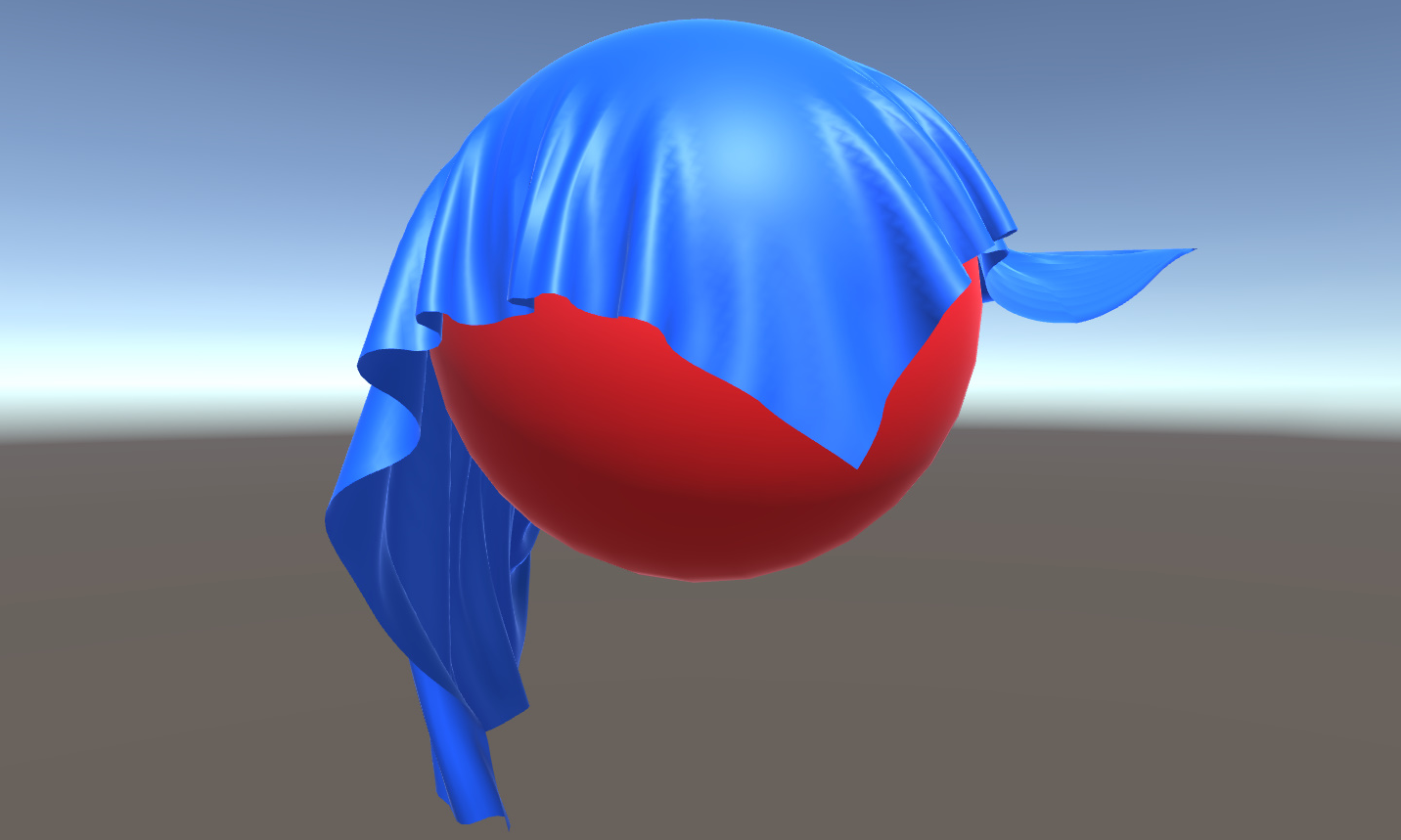
Figure 3.1: Cloth simulation
Simulation of the shape of a planar object that is deformed by an external force such as a flag or clothes is called Cloth Simulation , and much research has been done in the CG field as it is essential for animation creation. .. Already implemented in Unity, this chapter introduces a simple cloth simulation theory and GPU implementation for the purpose of learning parallel computing using GPU and understanding the nature of simulation and the meaning of parameters. I will do it.
Figure 3.1: Cloth simulation
An object such as a spring, rubber, or cushion that deforms when a force is applied and returns to its original shape when the force is stopped is called an elastic body . Since such elastic bodies cannot be represented by a single position or orientation, they represent an object by points and connections between them, and the movement of each point simulates the entire shape. This point is called a mass point and is considered to be a mass of mass without size. In addition, the connection between mass points has the property of a spring. The method of simulating an elastic body by calculating the expansion and contraction of each spring is called the mass-spring system, and it is a flag by calculating the motion of a set of mass points arranged in a two-dimensional shape. Simulation of clothes etc. is called Cloth Simulation.

Figure 3.2: Mass-Spring system
Each spring applies a force to the connected mass points according to the following equation.
F_{spring} = -k \left( I-I_{0} \right) - b v
Here, I is the current length of the spring (distance between the connected mass points ), and I_ {0} is the natural length of the spring at the start of the simulation (the length when no load is applied to the spring). ). k is a constant that represents the hardness of the spring, v is the velocity of the mass point, and b is the constant that determines the degree of velocity attenuation. This equation means that the spring always exerts a force that tries to return the distance between the connected mass points to the initial natural length of the spring. If the current distance of the spring is significantly different from the natural length of the spring, a larger force will be applied and it will be attenuated in proportion to the current velocity of the mass point.
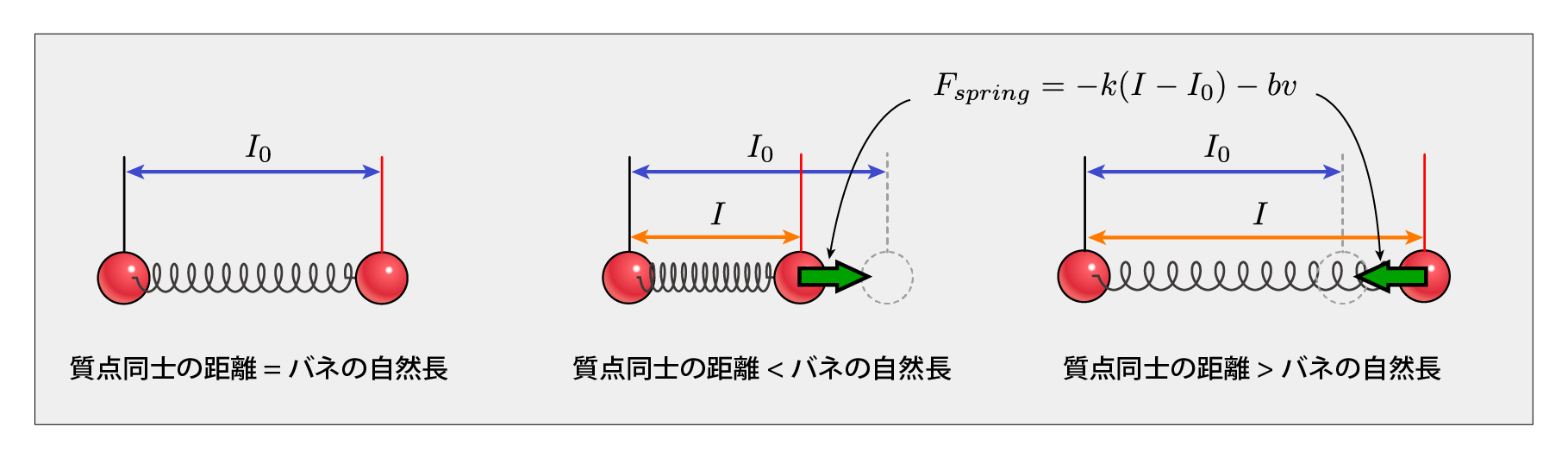
Figure 3.3: Spring force
In this simulation, the springs that make up the basic structure are connected in the horizontal and vertical directions, and the springs are also connected between the mass points located diagonally to prevent extreme deviation in the diagonal direction. They are called Structure Spring and Shear Spring, respectively, and one mass point connects the spring to 12 adjacent mass points, respectively.
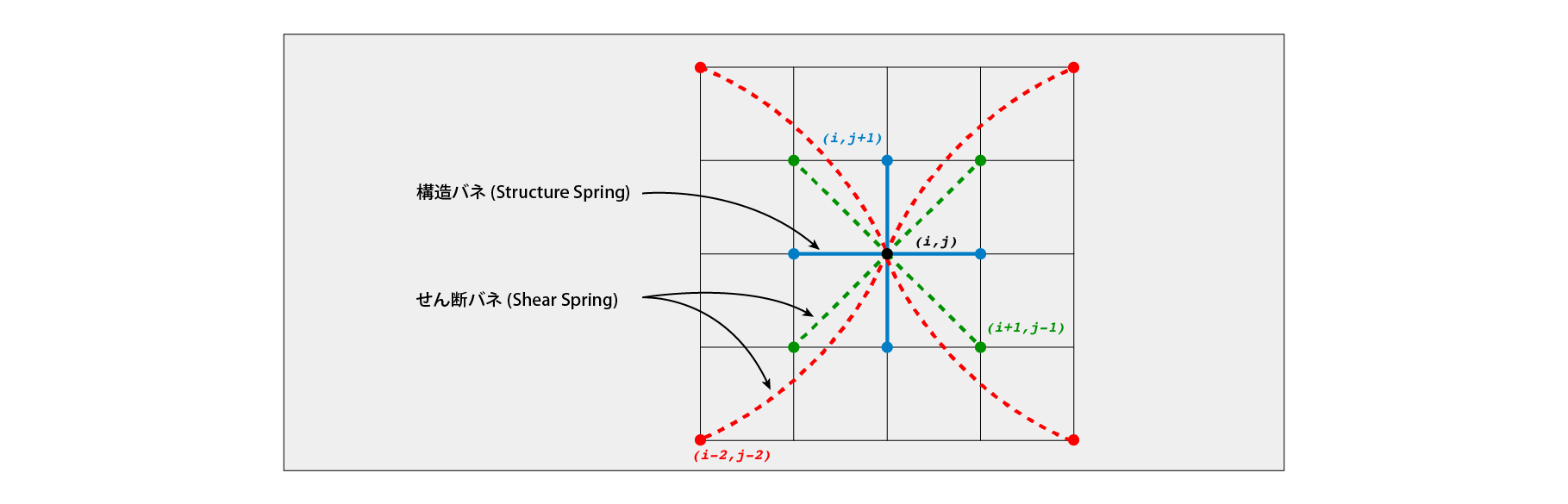
Figure 3.4: Spring structure
In this simulation, the position of the mass point is calculated by the Verlet method, which is a method often used in real-time applications. The Verlet method is one of the numerical solutions of Newton's equation of motion, and is a method used in molecular dynamics to calculate the movement of atoms. In calculating the motion of the object, but usually seek position from the speed, the Belle method, the current position and, the position of the previous time step from the position at the next time step will seek.
The derivation of the Verlet algebraic equation is shown below. F is the force applied to the mass point , m is the mass of the mass point, v is the velocity, x is the position, t is the time, and \ Delta t is the time step of the simulation (how much time is advanced per simulation calculation). ) Then, the equation of motion of the mass point is
m\dfrac {d^{2}x\left( t\right) }{dt^{2}}=F
Can be written. If this equation of motion is made into an algebraic equation using the following two Taylor expansions,
x\left( t+\Delta t\right) =x\left( t\right) +\Delta t\dfrac {dx\left( t\right) }{dt}+\dfrac {1}{2!}\Delta t^{2}\dfrac {dx^{2}\left( t\right) }{dt^{2}}+\dfrac {1}{3!}\Delta t^{3}\dfrac {dx^{3}\left( t\right) }{dt^{3}}+\ldots
x\left( t-\Delta t\right) =x\left( t\right) -\Delta t\dfrac {dx\left( t\right) }{dt}+\dfrac {1}{2!}\Delta t^{2}\dfrac {dx^{2}\left( t\right) }{dt^{2}}-\dfrac {1}{3!}\Delta t^{3}\dfrac {dx^{3}\left( t\right) }{dt^{3}}+\ldots
It will be. From these two Taylor expansion equations, if we solve the second-order derivative term and ignore the terms of \ Delta t of the second order or higher as sufficiently small, we can write as follows.
\dfrac {dx^{2}\left( t\right) }{dt^{2}}=\dfrac {x\left( t+\Delta t\right) -2x\left( t\right) +x\left( t-\Delta t\right) }{\Delta t^{2}}
If the second-order differential term is expressed by mass m and force F from the equation of motion ,
x\left( t+\Delta t\right) =2x\left( t\right) -x\left( t-\Delta t\right) +\dfrac {\Delta t^{2}}{m}F\left( t\right)
The algebraic equation is obtained. In this way, the formula for calculating the position in the next time step from the current position, the position in the previous time step, the mass, the force, and the value of the time step can be obtained.
The speed is calculated from the current position and the previous position in time.
v\left( t\right) =\dfrac {x\left( t\right) -x\left( t-\Delta t\right) }{\Delta t}
The speed obtained by this calculation is not very accurate, but it is not a problem as it is only used to calculate the damping of the spring.
Collision processing is performed in two phases: "collision detection" and "reaction to it".
Collision detection is performed by the following formula.
\left\| x\left( t+\Delta t\right) -c\right\| -r < 0
c and r are the sphere of center and radius , x \ left (t + \ Delta t \. right) is the position at the next time step is determined by Belle method. If a collision is detected, move the mass point onto the surface of the sphere to prevent the sphere from colliding with the cloth. Specifically, this is done by shifting the mass points inside the sphere in the direction normal to the surface of the collision point. The position of the mass point is updated according to the following formula.
\begin{aligned}
d=\dfrac {x\left( t+\Delta t\right) -c}{\left\| x\left( t+\Delta t\right) -c\right\|}
\\
x^{\prime}\left(t + \Delta t\right) = c + dr
\end{aligned}
x ^ {\ prime} \ left (t + \ Delta t \ right) is the updated position after the collision. d can be regarded as an approximation of the acceptable accuracy of the normal to the surface at the collision point, provided that the mass does not penetrate deeply.
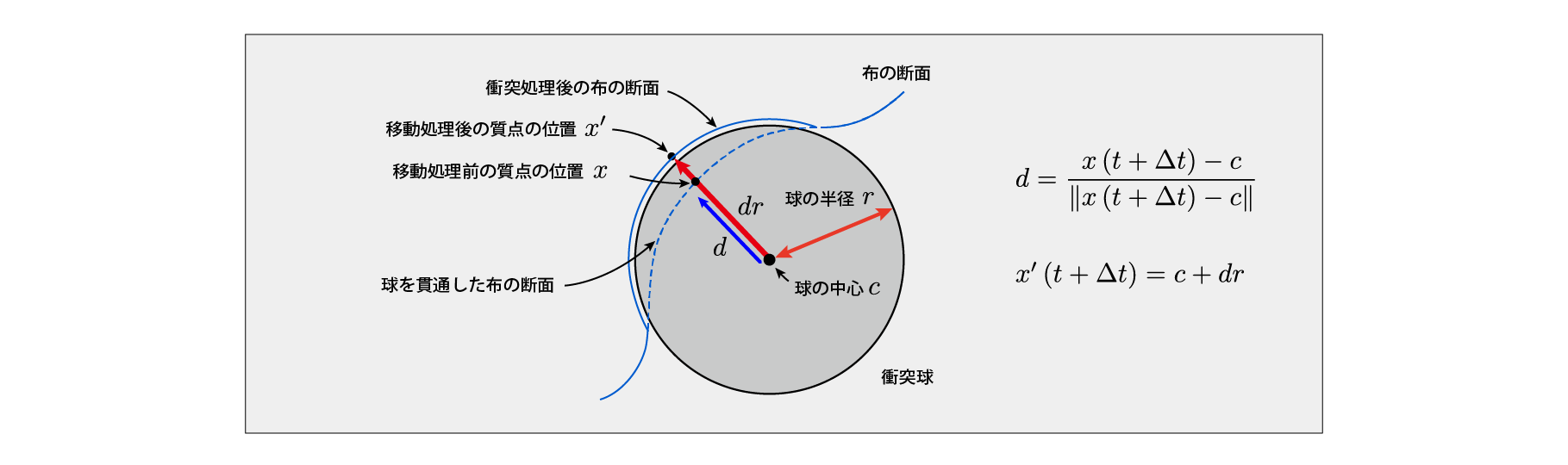
Figure 3.5: Collision calculation
The sample program is in the Assets / GPUClothSimulation folder in the repository below .
https://github.com/IndieVisualLab/UnityGraphicsProgramming4
This sample program uses the Compute Shader. Please check here for the operating environment of Compute Shader.
https://docs.unity3d.com/ja/2018.3/Manual/class-ComputeShader.html
It is a schematic diagram showing how each component and code work in relation to each other.
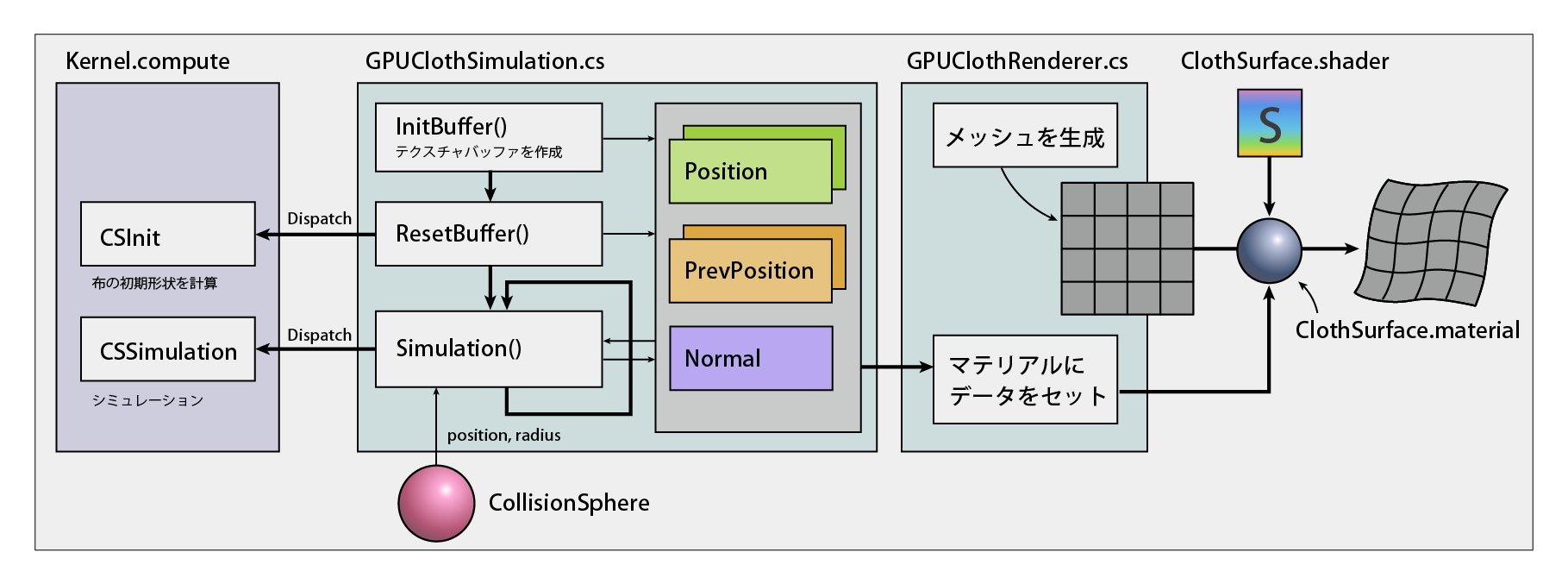
Figure 3.6: Structure and processing flow of each component and code
GPUClothSimulation.cs is a C # script that manages the data and processing used for simulation. This script creates and manages position and normal data used for simulation in RenderTexture format. In addition, processing is performed by calling the kernel described in Kernels.compute. The GPUClothRenderer.cs script provides visualization of the calculation results. The Mesh object generated by this script is drawn by transforming the geometry by the processing of ClothSurface.shader that refers to the RenderTexture that stores the position data and normal data that are the calculation results.
A C # script that controls the simulation.
using System.Collections;
using System.Collections.Generic;
using UnityEngine;

public class GPUClothSimulation : MonoBehaviour
{
    [Header("Simulation Parameters")]
    // Time step
    public float   TimeStep = 0.01f;
    // Number of simulation iterations
    [Range(1, 16)]
    public int VerletIterationNum = 4;
    // Cloth resolution (horizontal, vertical)
    public Vector2Int ClothResolution = new Vector2Int(128, 128);
    // Cloth grid spacing (natural length of spring)
    public float   RestLength = 0.02f;
    // Constants that determine the elasticity of the fabric
    public float   Stiffness = 10000.0f;
    // Velocity decay constant
    public float   Damp = 0.996f;
    // quality
    public float   Mass = 1.0f;
    // gravity
    public Vector3 Gravity = new Vector3(0.0f, -9.81f, 0.0f);

    [Header("References")]
    // Reference to Transform of collision sphere
    public Transform CollisionSphereTransform;
    [Header("Resources")]
    // Kernel to simulate
    public ComputeShader KernelCS;

    // Cloth simulation position data buffer
    private RenderTexture[] _posBuff;
    // Cloth simulation position data (previous time step) buffer
    private RenderTexture[] _posPrevBuff;
    // Cloth simulation normal data buffer
    private RenderTexture _normBuff;

    // Cloth length (horizontal, vertical)
    private Vector2 _totalClothLength;

    [Header("Debug")]
    // Show simulation buffer for debugging
    public bool EnableDebugOnGUI = true;
    // Buffer display scale during debug display
    private float _debugOnGUIScale = 1.0f;

    // Did you initialize the simulation resource?
    public bool IsInit { private set; get; }

    // Get the position data buffer
    public RenderTexture GetPositionBuffer()
    {
        return this.IsInit ? _posBuff[0] : null;
    }
    // Get a buffer of normal data
    public RenderTexture GetNormalBuffer()
    {
        return this.IsInit ? _normBuff : null;
    }
    // Get the resolution of the cloth
    public Vector2Int GetClothResolution()
    {
        return ClothResolution;
    }

    // Number of X, Y dimensional threads in the Compute Shader kernel
    const int numThreadsXY = 32;

    void Start()
    {
        var w = ClothResolution.x;
        var h = ClothResolution.y;
        var format = RenderTextureFormat.ARGBFloat;
        var filter = FilterMode.Point; // Prevent interpolation between texels
        // Create RenderTexture to store data for simulation
        CreateRenderTexture(ref _posBuff,     w, h, format, filter);
        CreateRenderTexture(ref _posPrevBuff, w, h, format, filter);
        CreateRenderTexture(ref _normBuff,    w, h, format, filter);
        // Reset the data for simulation
        ResetBuffer();
        // Set the initialized flag to True
        IsInit = true;
    }

    void Update()
    {
        // Press the r key to reset the simulation data
        if (Input.GetKeyUp("r"))
            ResetBuffer();

        // Perform a simulation
        Simulation();
    }

    void OnDestroy()
    {
        // Removed RenderTexture that stores data for simulation
        DestroyRenderTexture(ref _posBuff    );
        DestroyRenderTexture(ref _posPrevBuff);
        DestroyRenderTexture(ref _normBuff   );
    }

    void OnGUI ()
    {
        // Draw RenderTexture containing simulation data for debugging
        DrawSimulationBufferOnGUI();
    }

    // Reset simulation data
    void ResetBuffer()
    {
        ComputeShader cs = KernelCS;
        // Get kernel ID
        int kernelId = cs.FindKernel("CSInit");
        // Calculate the number of execution thread groups in the Compute Shader kernel
        int groupThreadsX =
            Mathf.CeilToInt((float)ClothResolution.x / numThreadsXY);
        int groupThreadsY =
            Mathf.CeilToInt((float)ClothResolution.y / numThreadsXY);
        // Calculation of cloth length (horizontal, vertical)
        _totalClothLength = new Vector2(
            RestLength * ClothResolution.x,
            RestLength * ClothResolution.y
        );
        // Set parameters and buffers
        cs.SetInts  ("_ClothResolution",
            new int[2] { ClothResolution.x, ClothResolution.y });
        cs.SetFloats("_TotalClothLength",
            new float[2] { _totalClothLength.x, _totalClothLength.y });
        cs.SetFloat ("_RestLength", RestLength);
        cs.SetTexture(kernelId, "_PositionBufferRW",     _posBuff[0]);
        cs.SetTexture(kernelId, "_PositionPrevBufferRW", _posPrevBuff[0]);
        cs.SetTexture(kernelId, "_NormalBufferRW",       _normBuff);
        // run the kernel
        cs.Dispatch(kernelId, groupThreadsX, groupThreadsY, 1);
        // copy the buffer
        Graphics.Blit (_posBuff [0], _posBuff [1]);
        Graphics.Blit (_posPrevBuff [0], _posPrevBuff [1]);
    }

    // simulation
    void Simulation()
    {
        ComputeShader cs = KernelCS;
        // Calculation of CSSimulation Calculation of the value of the time step per time
        float timestep = (float)TimeStep / VerletIterationNum;
        // Get kernel ID
        int kernelId = cs.FindKernel("CSSimulation");
        // Calculate the number of execution thread groups in the Compute Shader kernel
        int groupThreadsX =
            Mathf.CeilToInt((float)ClothResolution.x / numThreadsXY);
        int groupThreadsY =
            Mathf.CeilToInt((float)ClothResolution.y / numThreadsXY);

        // set parameters
        cs.SetVector("_Gravity", Gravity);
        cs.SetFloat ("_Stiffness", Stiffness);
        cs.SetFloat ("_Damp", Damp);
        cs.SetFloat ("_InverseMass", (float)1.0f / Mass);
        cs.SetFloat ("_TimeStep", timestep);
        cs.SetFloat ("_RestLength", RestLength);
        cs.SetInts  ("_ClothResolution",
            new int[2] { ClothResolution.x, ClothResolution.y });

        // Set the parameters of the collision sphere
        if (CollisionSphereTransform != null)
        {
            Vector3 collisionSpherePos = CollisionSphereTransform.position;
            float collisionSphereRad =
                CollisionSphereTransform.localScale.x * 0.5f + 0.01f;
            cs.SetBool  ("_EnableCollideSphere", true);
            cs.SetFloats("_CollideSphereParams",
                new float[4] {
                    collisionSpherePos.x,
                    collisionSpherePos.y,
                    collisionSpherePos.z,
                    collisionSphereRad
                });
        }
        else
            cs.SetBool("_EnableCollideSphere", false);

        for (var i = 0; i <VerletIterationNum; i ++)
        {
            // set the buffer
            cs.SetTexture(kernelId, "_PositionBufferRO",     _posBuff[0]);
            cs.SetTexture(kernelId, "_PositionPrevBufferRO", _posPrevBuff[0]);
            cs.SetTexture(kernelId, "_PositionBufferRW",     _posBuff[1]);
            cs.SetTexture(kernelId, "_PositionPrevBufferRW", _posPrevBuff[1]);
            cs.SetTexture(kernelId, "_NormalBufferRW",       _normBuff);
            // run thread
            cs.Dispatch(kernelId, groupThreadsX, groupThreadsY, 1);
            // Swap the read buffer and write buffer
            SwapBuffer(ref _posBuff[0],     ref _posBuff[1]    );
            SwapBuffer (ref _posPrevBuff [0], ref _posPrevBuff [1]);
        }
    }

    // Create RenderTexture to store data for simulation
    void CreateRenderTexture(ref RenderTexture buffer, int w, int h,
        RenderTextureFormat format, FilterMode filter)
    {
        buffer = new RenderTexture(w, h, 0, format)
        {
            filterMode = filter,
            wrapMode   = TextureWrapMode.Clamp,
            hideFlags  = HideFlags.HideAndDontSave,
            enableRandomWrite = true
        };
        buffer.Create();
    }

    // Create RenderTexture [] to store data for simulation
    void CreateRenderTexture(ref RenderTexture[] buffer, int w, int h,
        RenderTextureFormat format, FilterMode filter)
    {
        // ~ slightly~
    }

    // Removed RenderTexture that stores data for simulation
    void DestroyRenderTexture(ref RenderTexture buffer)
    {
        // ~ slightly~
    }

    // Remove RenderTexture [] to store data for simulation
    void DestroyRenderTexture(ref RenderTexture[] buffer)
    {
        // ~ slightly~
    }

    // Delete material
    void DestroyMaterial(ref Material mat)
    {
        // ~ slightly~
    }

    // Swap buffers
    void SwapBuffer(ref RenderTexture ping, ref RenderTexture pong)
    {
        RenderTexture temp = ping;
        ping = pong;
        pong = temp;
    }

    // Draw a buffer for simulation in the OnGUI function for debugging
    void DrawSimulationBufferOnGUI()
    {
        // ~ slightly~
    }
}
At the beginning, the parameters required for the simulation are declared. In addition, RenderTexture is used to hold the simulation results. The data used and obtained for this simulation
is.
The InitBuffer function creates a RenderTexture that stores the data needed for the calculation. For the position and the position in the previous time step, the data in the previous time step is used and the calculation is performed based on it, so create two for reading and one for writing. In this way, the method of creating data for reading and data for writing and letting the shader calculate efficiently is called Ping Pong Buffering .
Regarding the creation of RenderTexture, in format, the precision of the texture (the number of channels and the number of bits of each channel) is set. Generally, the lower the value, the faster the processing, but ARGBHalf (16bit per channel) has low accuracy and the calculation result becomes unstable, so set it to ARGBFloat (32bit per channel). Also, enableRandomWrite should be true to allow ComputeShader to write the calculation result. RenderTexture is not created on the hardware just by calling the constructor, so execute the Create function to make it available in the shader.
The ResetBuffer function initializes the RenderTexture that stores the data needed for the simulation. Get kernel ID, calculate number of thread groups, set various parameters such as cloth length, RenderTexture used for calculation for Compute Shader, and call CSInit kernel written in Kernels.compute for processing. .. The contents of the CSInit kernel are described in the following Kernels.compute details.
The Simulation function simulates the actual cloth. At the beginning, like the ResetBuffer function, get the kernel ID, calculate the number of thread groups, set various parameters used for simulation and RenderTexture. If you calculate with a large time step at a time, the simulation becomes unstable, so in Update (), divide the time step into small values so that the simulation can be calculated stably by dividing it into several times. I will. The number of iterations is set in VerletIterationNum .
Compute Shader that describes processing such as actual simulation.
This Compute Shader has
There are two kernels.
Each kernel performs the following processing.
Calculates the initial values of position and normal. The position of the mass point is calculated so that it is arranged in a grid pattern on the XY plane based on the thread ID (2D).
Perform a simulation. The figure below outlines the processing flow of the CSSimulation kernel.
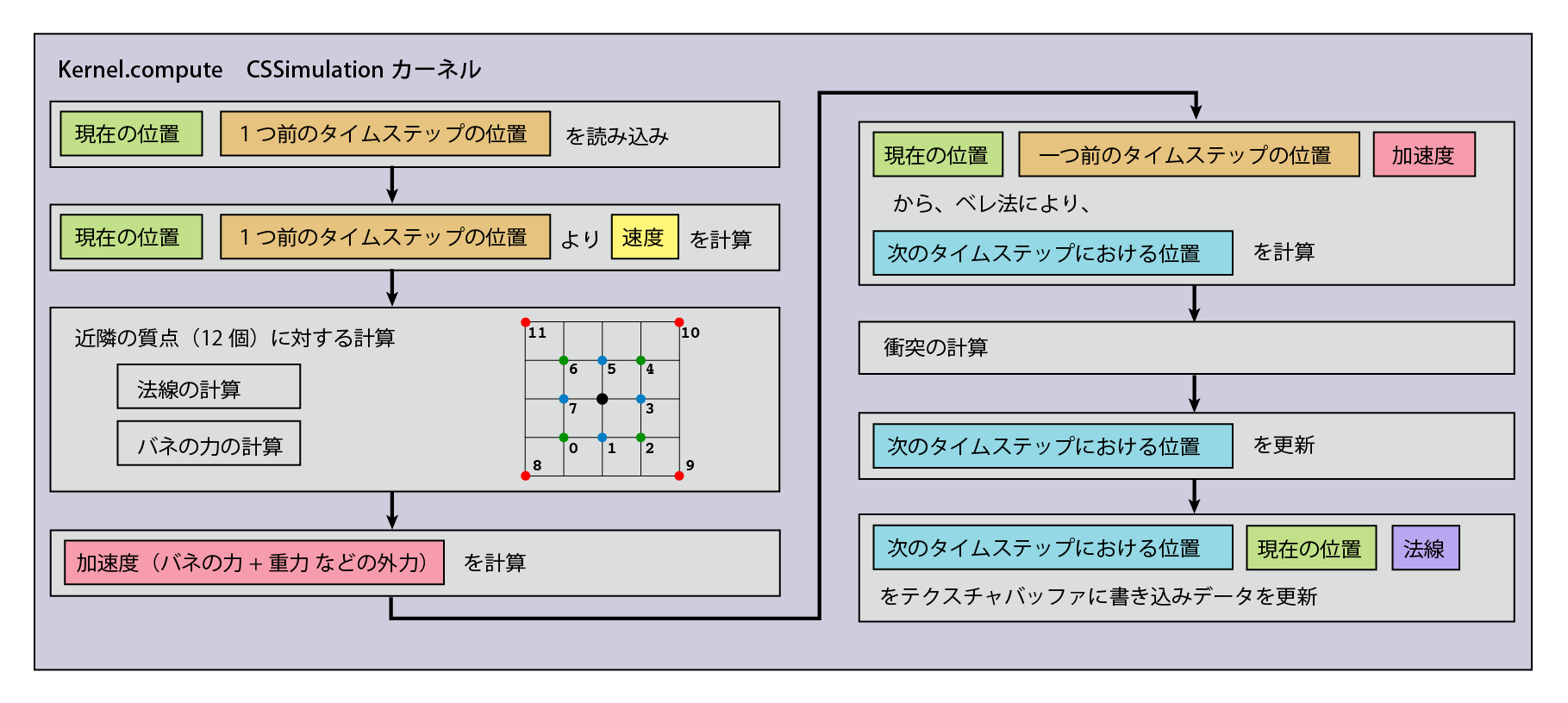
Figure 3.7: Calculation flow in CSSimulation kernel
The code is shown below.
#pragma kernel CSInit
#pragma kernel CSSimulation

#define NUM_THREADS_XY 32 // Number of kernel threads

// For reading position data (previous time step)
Texture2D<float4>   _PositionPrevBufferRO;
// For reading position data
Texture2D<float4>   _PositionBufferRO;
// For writing position data (previous time step)
RWTexture2D<float4> _PositionPrevBufferRW;
// For writing position data
RWTexture2D<float4> _PositionBufferRW;
// For writing normal data
RWTexture2D<float4> _NormalBufferRW;

int2 _ClothResolution; // Cloth resolution (number of particles) (horizontal, vertical)
float2 _TotalClothLength; // Overall length of the cloth

float _RestLength; // Natural length of the spring

float3 _Gravity; // Gravity
float _Stiffness; // Constant that determines the degree of expansion and contraction of the cloth
float _Damp; // Attenuation rate of cloth speed
float _InverseMass; // 1.0/quality

float _TimeStep; // Size of time step

bool _EnableCollideSphere; // Flag for collision handling
float4 _CollideSphereParams; // Collision handling parameters (pos.xyz, radius)

// Array of ID offsets (x, y) of nearby particles
static const int2 m_Directions[12] =
{
    int2 (-1, -1), // 0
    int2 (0, -1), // 1
    int2 (1, -1), // 2
    int2 (1, 0), // 3
    int2 (1, 1), // 4
    int2 (0, 1), // 5
    int2 (-1, 1), // 6
    int2 (-1, 0), // 7
    int2 (-2, -2), // 8
    int2 (2, -2), // 9
    int2 (2, 2), // 10
    int2 (-2, 2) // 11
};
// Returns the offset of the ID of nearby particles
int2 NextNeigh(int n)
{
    return m_Directions[n];
}

// Kernel that initializes the simulation buffer
[numthreads(NUM_THREADS_XY, NUM_THREADS_XY, 1)]
void CSInit(uint3 DTid : SV_DispatchThreadID)
{
    uint2 idx = DTid.xy;

    // location
    float3 pos = float3(idx.x * _RestLength, idx.y * _RestLength, 0);
    pos.xy -= _TotalClothLength.xy * 0.5;
    // normal
    float3 nrm = float3 (0, 0, -1);
    // write to buffer
    _PositionPrevBufferRW[idx] = float4(pos.xyz, 1.0);
    _PositionBufferRW[idx]     = float4(pos.xyz, 1.0);
    _NormalBufferRW[idx]       = float4(nrm.xyz, 1.0);
}

// Kernel to simulate
[numthreads(NUM_THREADS_XY, NUM_THREADS_XY, 1)]
void CSSimulation(uint2 DTid : SV_DispatchThreadID)
{
    int2 idx = (int2)DTid.xy;
    // Cloth resolution (number of particles) (horizontal, vertical)
    int2   res = _ClothResolution.xy;
    // read position
    float3 pos = _PositionBufferRO[idx.xy].xyz;
    // Read position (previous time step)
    float3 posPrev = _PositionPrevBufferRO[idx.xy].xyz;
    // Calculate the speed from the position and the position of the previous time step
    float3 vel = (pos - posPrev) / _TimeStep;

    float3 normal   = (float3)0; // 法線
    float3 lastDiff = (float3) 0; // Variable for storing direction vector used when calculating normal
    float iters = 0.0; // Variable for adding the number of iterations when calculating normals

    // Substitute the force applied to the particles and the value of gravity as the initial value
    float3 force = _Gravity.xyz;
    // 1.0 / quality
    float  invMass = _InverseMass;

    // If it is the top side of the cloth, do not calculate to fix the position
    if (idx.y == _ClothResolution.y - 1)
        return;

    // Calculate for nearby particles (12)
    [unroll]
    for (int k = 0; k < 12; k++)
    {
        // Offset of ID (coordinates) of neighboring particles
        int2 neighCoord = NextNeigh(k);
        // Do not calculate for X-axis, edge particles
        if (((idx.x+neighCoord.x) < 0) || ((idx.x+neighCoord.x) > (res.x-1)))
            continue;
        // Do not calculate for Y-axis, edge particles
        if (((idx.y + neighCoord.y) <0) || ((idx.y + neighCoord.y)> (res.y-1)))
            continue;
        // ID of nearby particles
        int2   idxNeigh = int2(idx.x + neighCoord.x, idx.y + neighCoord.y);
        // Position of nearby particles
        float3 posNeigh = _PositionBufferRO[idxNeigh].xyz;
        // Difference in the position of nearby particles
        float3 posDiff = posNeigh - pos;

        // Normal calculation
        // Direction vector from the base point to nearby particles
        float3 currDiff = normalize(posDiff);
        if ((iters > 0.0) && (k < 8))
        {
            // With the direction vector with the neighboring particles examined one time ago
            // If the current angle is obtuse
            float a = dot(currDiff, lastDiff);
            if (a > 0.0) {
                // Find and add orthogonal vectors by cross product
                normal += cross(lastDiff, currDiff);
            }
        }
        lastDiff = currDiff; // Keep for calculation with next neighbor particles

        // Calculate the natural length of the spring with neighboring particles
        float  restLength = length(neighCoord * _RestLength);
        // Calculate the force of the spring
        force += (currDiff*(length(posDiff)-restLength))*_Stiffness-vel*_Damp;
        // Addition
        if (k < 8) iters += 1.0;
    }
    // Calculate normal vector
    normal = normalize (normal / - (iters - 1.0));

    // acceleration
    float3 acc = (float3)0.0;
    // Apply the law of motion (the magnitude of acceleration is proportional to the magnitude of force and inversely proportional to mass)
    acc = force * invMass;

    // Position calculation by Verlet method
    float3 tmp = pos;
    pos = pos * 2.0 - posPrev + acc * (_TimeStep * _TimeStep);
    posPrev = tmp; // Position of the previous time step

    // Calculate collision
    if (_EnableCollideSphere)
    {
        float3 center = _CollideSphereParams.xyz; // Center position
        float  radius = _CollideSphereParams.w;   // 半径

        if (length(pos - center) < radius)
        {
            // Calculate the unit vector from the center of the collision sphere to the position of the particles on the cloth
            float3 collDir = normalize(pos - center);
            // Move the position of particles to the surface of the collision sphere
            pos = center + collDir * radius;
        }
    }

    // write
    _PositionBufferRW[idx.xy]     = float4(pos.xyz,     1.0);
    _PositionPrevBufferRW[idx.xy] = float4(posPrev.xyz, 1.0);
    _NormalBufferRW[idx.xy]       = float4(normal.xyz,  1.0);
}
In this component
to hold.
Please check the sample code for details.
In this shader, the position and normal data obtained by simulation are acquired in the vertex shader, and the shape of the mesh is changed by rewriting the vertices.
Please check the sample code for details
When you run it, you'll see an object that behaves like a cloth that collides with the sphere. If you change the various parameters used in the simulation, you can see the change in the movement.
TimeStep is the time of the simulation that progresses when the Update function is executed once. If you increase it, the change in movement will be large, but if you set a value that is too large, the simulation will become unstable and the value will diverge.
VerletIterationNum is the number of CSSimulation kernels to execute in the Simulation function. Even if the value of the same time step is increased, increasing this value will make the simulation easier to stabilize, but will increase the calculation load.
ClothResolution is the resolution of the cloth. If you increase it, you will see many details such as wrinkles, but if you increase it too much, the simulation will become unstable. Since the thread size is set to 32 on ComputeShader, it is desirable to be a multiple of 32.
RestLength is the natural length of the spring. Since it is the distance between the springs, the length of the cloth is Cloth Resolution x Rest Length.
Stiffness is the hardness of the spring. Increasing this value will reduce the stretch of the fabric, but increasing it too much will make the simulation unstable.
Damp is the attenuation value of the moving speed of the spring. Increasing this value will make the mass point stagnant faster and less likely to vibrate, but will reduce the change.
Mass is the mass of the mass point. Increasing this value will cause the cloth to move as if it were heavy.
Gravity is the gravity on the cloth. The acceleration of the cloth is the combination of this gravity and the force of the spring.
If you check EnableDebugOnGUI , a texture that stores the position that is the result of the simulation, the position in the previous time step, and the normal data is drawn in the upper left of the screen for confirmation.
When you press the R key, the cloth returns to its initial state. If the simulation becomes unstable and the values diverge, please return to the initial state.
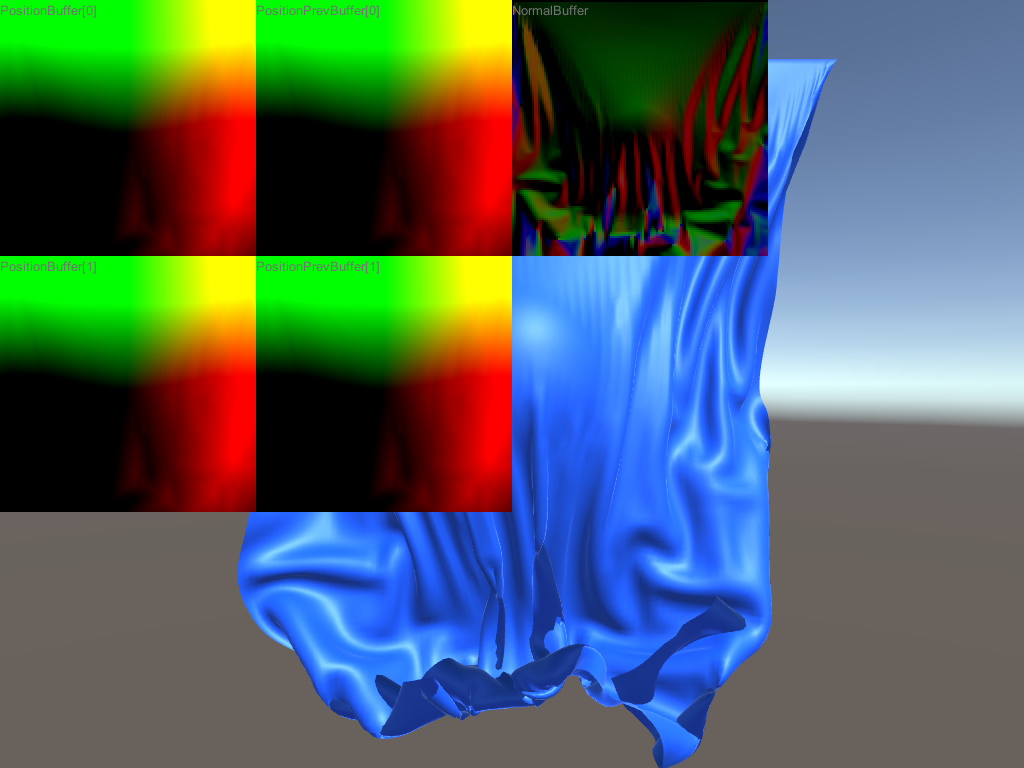
Figure 3.8: Execution result (calculation result RenderTexture is drawn in screen space)
If you open Assets / GPUClothSimulation / Debug / GPUClothSimulationDebugRender.unity , you can see the spring that connects the mass points with particles and lines.
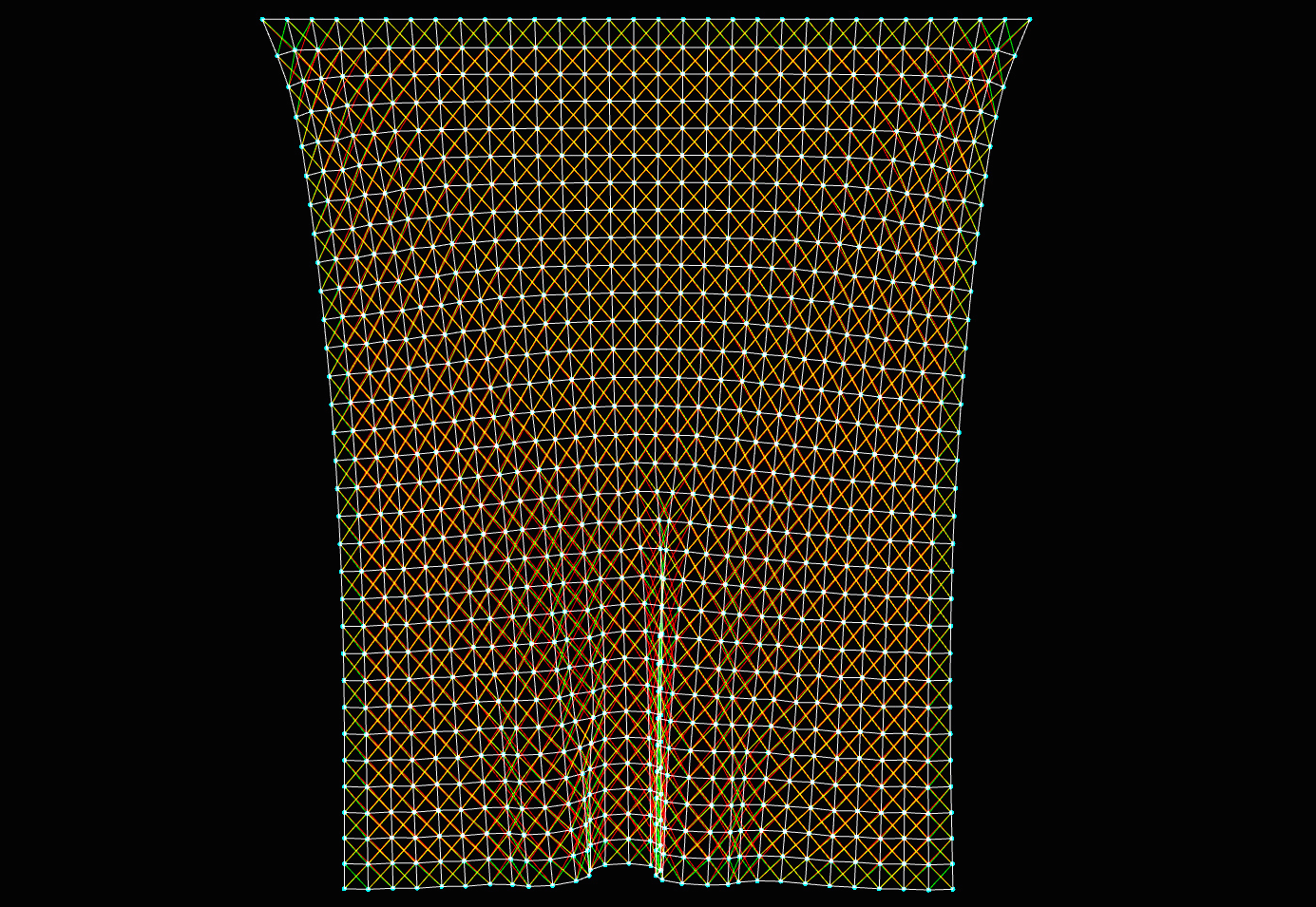
Figure 3.9: Draw mass points and springs with particles and lines
The movement obtained by the mass point-spring system simulation changes in a complicated manner depending on how the force is applied, and an interesting shape can be created. The cloth simulation presented in this chapter is very simple. Challenges such as collisions with objects of complex geometry rather than simple things like spheres, collisions between cloths, friction, consideration of the fiber structure of cloths, stability of simulations when taking large time steps, etc. Much research has been done to overcome it. If you are interested in physics engine, why not pursue it?